Section 18 — EntityFrameworkCore
Introduction to EntityFrameworkCore
EntityFrameworkCore is light-weight, extensible and cross-platform framework for accessing databases in .NET applications.
It is the most-used database framework for Asp.Net Core Apps.
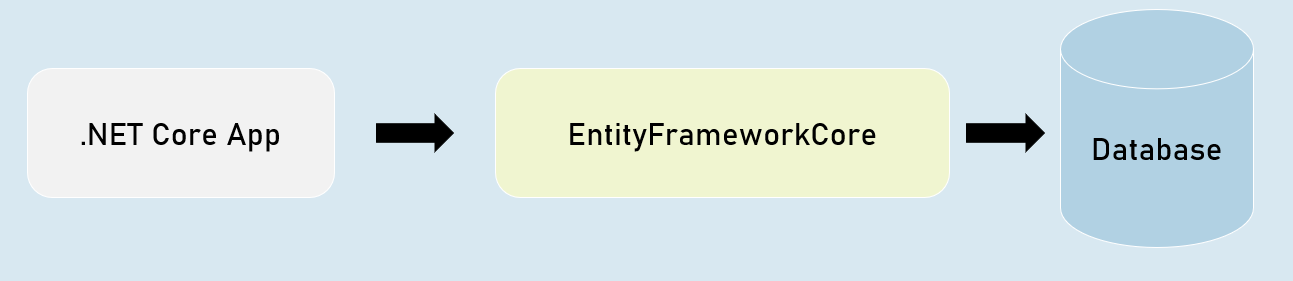
EFCore Models
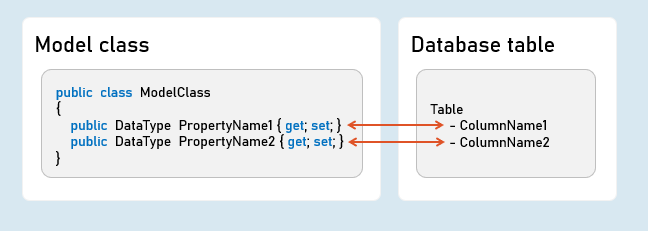
Pros & Cons of EntityFrameworkCore
Shorter Code
The CRUD operations / calling stored procedures are done with shorter amount of code than ADO.NET.
Performance
EFCore performs slower than ADO.NET.
So ADO.NET or its alternatives (such as Dapper) are recommended for larger & high-traffic applications.
Strongly-Typed
The columns as created as properties in model class.
So the Intellisense offers columns of the table as properties, while writing the code.
Plus, the developer need not convert data types of values; it’s automatically done by EFCore itself.
Approaches in Entity Framework Core
EFCore Approaches
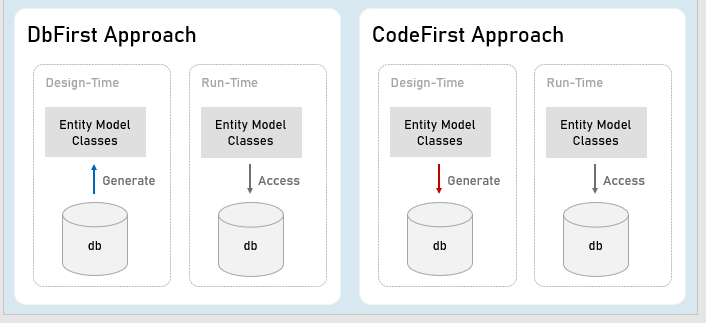
Pros and Cons of EFCore Approaches
CodeFirst Approach
Suitable for newer databases.
Manual changes to DB will be most probably lost because your code defines the database.
Stored procedures are to be written as a part of C# code.
Suitable for smaller applications or prototype-level applications only; but not for larger or high data-intense applications.
DbFirst Approach
Suitable if you have an existing database or DB designed by DBAs, developed separately.
Manual changes to DB can be done independently.
Stored procedures, indexes, triggers etc., can be created with T-SQL independently.
Suitable for larger applications and high data-intense applications.
DbContext and DbSet
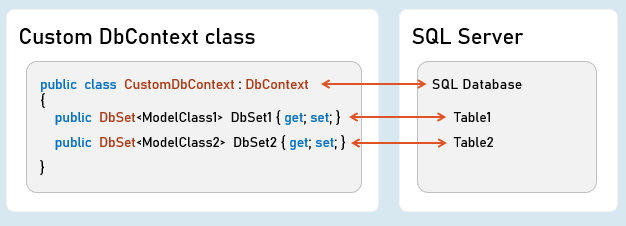
DbContext
An instance of DbContext is responsible to hold a set of DbSets’ and represent a connection with database.
DbSet
Represents a single database table; each column is represented as a model property.
Add DbContext as Service in Program.cs:
builder.Services.AddDbContext<DbContextClassName>( options => {
options.UseSqlServer();
}
);
Code-First Migrations
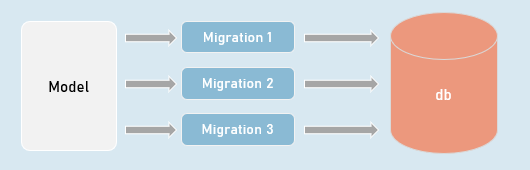
Migrations
Creates or updates database based on the changes made in the model.
in Package Manager Console (PMC):
Add-Migration MigrationName
//Adds a migration file that contains C# code to update the database
Update-Database -Verbose
//Executes the migration; the database will be created or table schema gets updated as a result.
Seed Data
in DbContext:
modelBuilder.Entity<ModelClass>().HasData(entityObject);It adds initial data (initial rows) in tables, when the database is newly created.
EF CRUD Operations - Query
SELECT - SQL
ORDER BY Column
SELECT Column1, Column2 FROM TableName
WHERE Column = value
LINQ Query:
_dbContext.DbSetName
.Where(item => item.Property == value)
.OrderBy(item => item.Property)
.Select(item => item);
//Specifies condition for where clause
//Specifies condition for 'order by' clause
//Expression to be executed for each row
EF CRUD Operations - Insert
INSERT - SQL
INSERT INTO TableName(Column1, Column2) VALUES (Value1, Value2)Add:
_dbContext.DbSetName.Add(entityObject);
//Adds the given model object (entity object) to the DbSet.
SaveChanges()
_dbContext.SaveChanges();
//Generates the SQL INSERT statement based on the model object data and executes the same at database server.
EF CRUD Operations - Delete
DELETE - SQL
DELETE FROM TableName WHERE ConditionRemove:
_dbContext.DbSetName.Remove(entityObject);
//Removes the specified model object (entity object) to the DbSet.
SaveChanges()
_dbContext.SaveChanges();
//Generates the SQL DELETE statement based on the model object data and executes the same at database server.
EF CRUD Operations - Update
UPDATE - SQL
UPDATE TableName SET Column1 = Value1, Column2 = Value2 WHERE PrimaryKey = ValueUpdate:
entityObject.Property = value;
//Updates the specified value in the specific property of the model object (entity object) to the DbSet.
SaveChanges()
_dbContext.SaveChanges();
//Generates the SQL UPDATE statement based on the model object data and executes the same at database server.
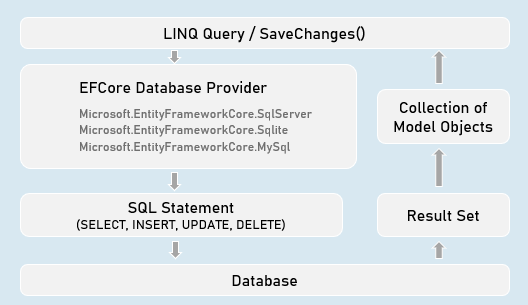
How EF Query Works?
Workflow of Query Processing in EF
EF - Calling Stored Procedures
Stored Procedure for CUD (INSERT | UPDATE | DELETE):
params object[] parameters)
int DbContext.Database.ExecuteSqlRaw(
string sql,
//Eg: "EXECUTE [dbo].[StoredProcName] @Param1 @Parm2
//A list of objects of SqlParameter type
Stored Procedure for Retrieving (Select):
paramsobject[] parameters)
IQueryable<Model> DbSetName.FromSqlRaw(
string sql,
//Eg: "EXECUTE [dbo].[StoredProcName] @Param1 @Parm2"
//A list of objects of SqlParameter type
Creating Stored Procedure (SQL Server)
CREATE PROCEDURE [schema].[procedure_name](@parameter_name data_type, @parameter_name data_type)
AS BEGIN
statements
END
Advantages of Stored Procedure
Single database call
You can execute multiple / complex SQL statements with a single database call.
As a result, you’ll get:
- Better performance (as you reduce the number of database calls)
- Complex database operations such as using temporary tables / cursors becomes easier.
Maintainability
The SQL statements can be changed easily WITHOUT modifying anything in the application source code (as long as inputs and outputs doesn’t change)
[Column] Attribute
Model class
Specifies column name and data type of SQL Server table.
public class ModelClass
{
[Column("ColumnName", TypeName = "datatype")]
public DataType PropertyName { get; set; }
[Column("ColumnName", TypeName = "datatype")]
publicDataTypePropertyName { get; set; }
}
EF - Fluent API
DbContext class
public class CustomDbContext : DbContext
{
protected override void OnModelCreating(ModelBuilder modelBuilder)
{
//Specify table name (and schema name optionally) to be mapped to the model class
modelBuilder.Entity<ModelClass>( ).ToTable("table_name", schema: "schema_name");
//Specify view name (and schema name optionally) to be mapped to the model class
modelBuilder.Entity<ModelClass>( ).ToView("view_name", schema: "schema_name");
//Specify default schema name applicable for all tables in the DbContext
modelBuilder.HasDefaultSchema("schema_name");
}
}
public class CustomDbContext : DbContext
{
protected override void OnModelCreating(ModelBuilder modelBuilder)
{
modelBuilder.Entity<ModelClass>( ).Property(temp => temp.PropertyName)
.HasColumnName("column_name") //Specifies column name in table
.HasColumnType("data_type") //Specifies column data type in table
.HasDefaultValue("default_value") //Specifies default value of the column
}
}
public class CustomDbContext : DbContext
{
protected override void OnModelCreating(ModelBuilder modelBuilder)
{
//Adds database index for the specified column for faster searches
modelBuilder.Entity<ModelClass>( ).HasIndex("column_name").IsUnique();
//Adds check constraint for the specified column - that executes for insert & update
modelBuilder.Entity<ModelClass>( ).HasCheckConstraint("constraint_name", "condition");
}
}
EF - Table Relations with Fluent API
Table Relations
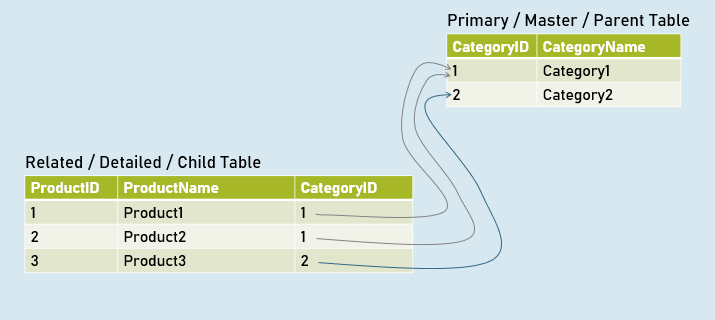
EF - Table Relations with Navigation Properties
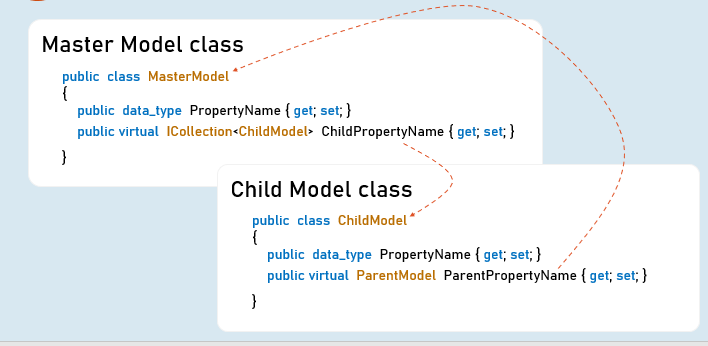
EF - Table Relations with Fluent API
DbContext class
public class CustomDbContext : DbContext
{
protected override void OnModelCreating(ModelBuilder modelBuilder)
{
//Specifies relation between primary key and foreign key among two tables
modelBuilder.Entity<ChildModel>( )
.HasOne<ParentModel>(parent => parent.ParentReferencePropertyInChildModel)
.WithMany(child => child.ChildReferencePropertyInParentModel) //optional
.HasForeignKey(child => child.ForeignKeyPropertyInChildModel)
}
}
EF - Async Operations
async
- The method is awaitable.
- Can execute I/O bound code or CPU-bound code
await
- Waits for the I/O bound or CPU-bound code execution gets completed.
- After completion, it returns the return value.
Generate PDF Files

Rotativa.AspNetCore:
PageOrientation = Orientation.Landscape
using Rotativa.AspNetCore;
using Rotativa.AspNetCore.Options;
return new ViewAsPdf("ViewName", ModelObject, ViewData)
{
PageMargins = new Margins() { Top = 1, Right = 2, Bottom = 3, Left = 4 },
}
Generate CSV Files (CSVHelper)
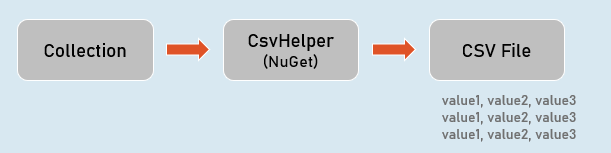
CsvWriter:
WriteRecords(records)
Writes all objects in the given collection.
Eg:
1,abc
2,def
WriteHeader( )
Writes all property names as headings.
Eg:
Id, Name
WriteRecord(record)
Writes the given object as a row.
Eg:
1, abc
WriteField( value )
Writes given value.
NextRecord( )
Moves to the next line.
Flush( )
Writes the current data to the stream.
Generate Excel Files (EPPlus)

ExcelWorksheet
[“cell_address”].Value
Sets or gets value at the specified cell.
[“cell_address”].Style
Sets or gets formatting style of the specific cell.