Overview of Minimal API
- It is a Microsoft's API that is used to create HTTP services (or HTTP APIs) with minimal dependencies on packages.- Alternative to Web API Controllers. Mainly used to create HTTP services or Microservices.
REST API (Representational State Transfer)
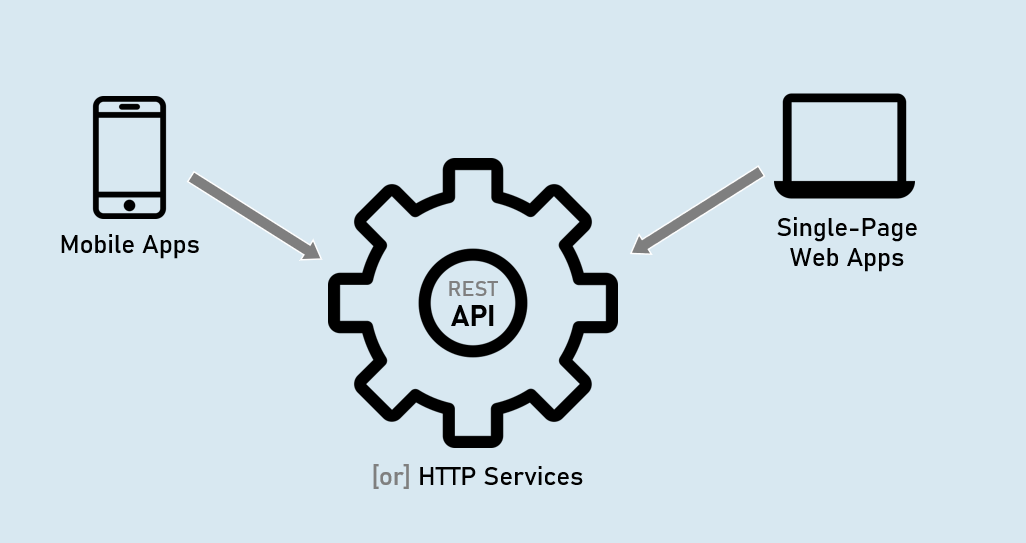
MVC Controller (Microsoft.AspNetCore.Mvc.Controller)
- Full support for model binding and model validation.
- Full support for views.
- Full support for filters & filter pipeline.
API Controller (Microsoft.AspNetCore.Mvc.ApiControllerAttribute)
- Full support for model binding and model validation.
- No support for views.
- Full support for filters & filter pipeline.
Minimal API (IApplicationBuilder.Map* Methods)
• Limited support for custom model binding and custom model validation (needs to improve).- No support for views.
- No support for filters & filter pipeline; but supports “Endpoint Filters” alternatively.
Routing in Minimal API
1. MapGet()
Creates an endpoint that receives HTTP GET request.
app.MapGet("/route", async (HttpContext context) => {
await context.Response.WriteAsync("your response");
});
2. MapPost()
Creates an endpoint that receives HTTP DELETE request.
app.MapDelete("/route", async (HttpContext context) => {
await context.Response.WriteAsync("your response");
});
3. MapPut()
Creates an endpoint that receives HTTP PUT request.
app.MapPut("/route", async (HttpContext context) => {
await context.Response.WriteAsync("your response");
});
4. MapDelete()
Creates an endpoint that receives HTTP DELETE request.
app.MapDelete("/route", async (HttpContext context) => {
await context.Response.WriteAsync("your response");
});
Route Parameters in Minimal API
Route parameters can be created as you were creating them in UseEndpoints() or in MVC controllers.
app.MapGet("/route/{parameter}", async (HttpContext context) => {
await context.Response.WriteAsync("your response");
});
Route Constraints in Minimal API
Route constraints can be used as you were using them in UseEndpoints() or in MVC controllers.
Eg: int, bool, datetime, decimal, double, float, guid, long, Minlength, maxlength, length, min, max, range, alpha, regex, required
app.MapGet("/route/{parameter:constraint}", async (HttpContext context) => {
await context.Response.WriteAsync("your response");
});
Map Groups in Minimal API
A map group (or route group) is a set of endpoints with a common prefix.
A map group is a collection of endpoints created with Map* methods such as MapGet(), MapPost() etc.
MapGet()
Creates an endpoint that receives HTTP GET request.
var mapGroup = app.MapGroup("/route-prefix");
mapGroup.MapGet(…);
mapGroup.MapPost(..);
IResult
The Microsoft.AspNetCore.Http.IResult is the base interface that is implemented by different result types such as Ok, Json, BadRequest etc., which can be returned by endpoints in minimal API.
1. Results.Ok( )
2. Results.Json( )
3. Results.Text( )
4. Results.File( )
5. Results.BadRequest( )
6. Results.NotFound( )
7. Results.Unauthorized( )
8. Results.ValidationProblem( )
IResult Implementations
1. Results.Ok
Response Content-type: application/json [or] text/plain
Response Status Code: 200
return Results.Ok(response_object); //can be a string or model2. Results.Json
Response Content-type: application/json
Response Status Code: 200
return Results.Json(response_object); //should be a model3. Results.Text
Response Content-type: text/plain
Response Status Code: 200
return Results.Text(response_string); //should be a string4. Results.File
Response Content-type: application/octet-stream
Response Status Code: 200
return Results.File(stream_object); //should be 'System.IO.Stream' type5. Results.BadRequest
Response Content-type: N/A
Response Status Code: 400
return Results.BadRequest(response_object); //can be a string or model6. Results.NotFound
Response Content-type: N/A
Response Status Code: 404
return Results.NotFound(response_object); //can be a string or model7. Results.Unauthorized
Response Content-type: N/A
Response Status Code: 401
return Results.Unauthorized(response_object); //can be a string or model8. Results.ValidationProblem
Response Content-type: application/json
Response Status Code: 400
return Results.ValidationProblem(response_object); //automatically creates JSON with validation errorsEndpoint Filter
EndPoint Filters execute much like ‘action filters’ i.e., ‘before’ and ‘after’ the execution of minimal API endpoint.
They are mainly used to validate parameters of the endpoint.
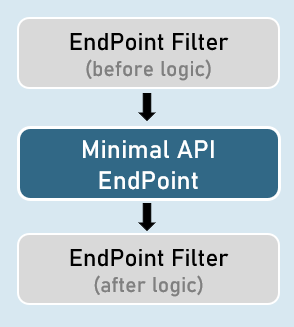
Creating an Endpoint Filter
Endpoint filters can be registered by providing a Delegate that takes a EndpointFilterInvocationContext and returns a EndpointFilterDelegate.
app.MapGet("/route", () => {
//your endpoint code here
})
.AddEndpointFilter(async (context, next) => {
//before logic
var result = await next(context); //calls subsequent filter or endpoint
//after logic
return result;
});
IEndpointFilter
Creating an Endpoint Filter by implementing IEndpointFilter interface
The InvokeAsync() method takes a EndpointFilterInvocationContext and returns a EndpointFilterDelegate.
class CustomEndpointFilter : IEndpointFilter
{
public async ValueTask<object?> InvokeAsync(EndpointFilterInvocationContext context, EndpointFilterDelegate next)
{
//before logic
var result = await next(context); //calls subsequent filter or endpoint
//after logic
return result;
}
}