Best Practices of Unit Tests
Isolated / Stand-alone
(separated from any other dependencies such as file system or database)
Test single method at-a-time
(should not test more than one method in a single test case)
Unordered
(can be executed in any order)
Fast
(Tests should take little time to run (about few milliseconds))
Repeatable
(Tests can run repeatedly but should give same result, if no changes in the actual source code)
Timely
(Time taken for writing a test case should not take longer time, than then time taken for writing the code that is being tested)
Mocking the DbContext
Test Double
A “test double” is an object that look and behave like their production equivalent objects.
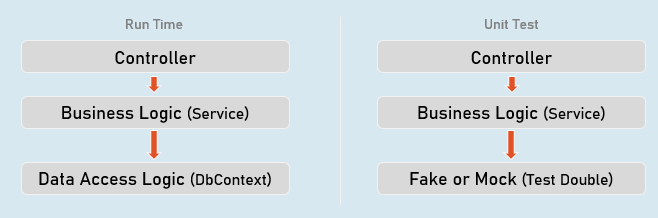
A “test double” is an object that look and behave like their production equivalent objects.
Fake
An object that providers an alternative (dummy) implementation of an interface
Mock
An object on which you fix specific return value for each individual method or property, without actual / full implementation of it.
Mocking the DbContext
Install-Package Moq
Install-Package EntityFrameworkCoreMock.Moq
Mocking the DbContext:
var dbContextOptions = new DbContextOptionsBuilder<DbContextClassName>().Options;
//mock the DbContext
DbContextMock<DbContextClass> dbContextMock = new DbContextMock<DbContextClass>(dbContextOptions);
var initialData = new List<ModelClass>() { … };
//mock the DbSet
var dbSetMock = dbContextMock.CreateDbSetMock(temp => temp.DbSetName, initialData);
//create service instance with mocked DbContext
var service = newServiceClass(dbContextMock.Object);
AutoFixture
AutoFixture generates objects of the specified classes and their properties with some fake values based their data types.
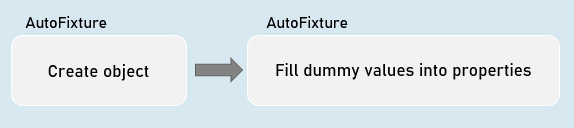
Normal object creation
new ModelClass() {Property1 = value,
Property2 = value
}With AutoFixture
Fixture.Create<ModelClass>(); //initializes all properties of the specified model class with dummy valuesAutoFixture
Install-Package AutoFixtureWorking with AutoFixture:
var fixture = new Fixture();
//Simple AutoFixture
var obj1 = fixture.Create<ModelClass>();
//Customization with AutoFixture
var obj2 = fixture.Build<ModelClass>()
.With(temp => temp.Property1, value)
.With(temp => temp.Property2, value)
.Create();
Fluent Assertions
Fluent Assertions are a set of extension methods to make the assertions in unit testing more readable and human-friendly.
Install-Package FluentAssertionsAssert
//Equal
Assert.Equal(expected, actual);
//Not Equal
Assert.NotEqual(expected, actual);
//Null
Assert.Null(actual);
//Not Null
Assert.NotNull(actual);
//True
Assert.True(actual);
//False
Assert.False(actual);
//Empty
Assert.Empty(actual);
//Not Empty
Assert.NotEmpty(actual);
//Null or empty
Assert.True(string.IsNullOrEmpty(actual)); //string
Assert.True(actual == null || actual.Length == 0); //collection
//Should not be null or empty
Assert.False (string.IsNullOrEmpty(actual)); //string
Assert.False(actual == null || actual.Length == 0); //collection
//number should be positive
Assert.True(actual > 0);
//number should be negative
Assert.True(actual < 0);
//number should be >= expected
Assert.True(actual >= expected);
//number should be <= expected
Assert.True(actual <= expected);
//number should be in given range
Assert.True(actual >= minimum && actual <= maximum);
//number should not be in given range
Assert.True(actual < minimum || actual > maximum);
//check data type
Assert.IsType<ExpectedType>(actual);
//Compare properties of two objects (Equals method SHOULD BE overridden)
Assert.Equal(expected, actual);
//Compare properties (should not be equal) of two objects (Equals method SHOULD BE overridden)
Assert.NotEqual(expected, actual);
Fluent Assertion
//Equal
actual.Should().Be(expected);
//Not Equal
actual.Should().NotBe(expected);
//Null
actual.Should().BeNull();
//Not Null
actual.Should().NotBeNull();
//True
actual.Should().BeTrue();
//False
actual.Should().BeFalse();
//Empty
actual.Should().BeEmpty();
//Not Empty
actual.Should().NotBeEmpty();
//Null or empty
actual.Should().BeNullOrEmpty();
//Should not be null or empty
actual.Should().NotBeNullOrEmpty();
//number should be positive
actual.Should().BePositive();
//number should be negative
actual.Should().BeNegative();
//number should be >= expected
actual.Should().BeGreaterThanOrEqualTo(expected);
//number should be <= expected
actual.Should().BeLessThanOrEqualTo(expected);
//number should be in given range
actual.Should().BeInRange(minimum, maximum);
//number should not be in given range
actual.Should().NotBeInRange(minimum, maximum);
//number should be in given range
actual.Should().BeInRange(minimum, maximum);
//number should not be in given range
actual.Should().NotBeInRange(minimum, maximum);
//check data type (same type)
actual.Should().BeOfType<ExpectedType>();
//check data type (same type or derived type)
actual.Should().BeAssignableTo<ExpectedType>();
//Compare properties of two objects (Equals method NEED NOT be overridden)
actual.Should().BeEquivalentTo(expected);
//Compare properties (should not equal) of two objects (Equals method NEED NOT be overridden)
actual.Should().BeNotEquivalentTo(expected);
Fluent Assertions - Collections:
actualCollection.Should().BeEmpty();
actualCollection.Should().NotBeEmpty();
actualCollection.Should().HaveCount(expectedCount);
actualCollection.Should().NotHaveCount(expectedCount);
actualCollection.Should().HaveCountGreaterThanOrEqualTo(expectedCount);
actualCollection.Should().HaveCountLessThanOrEqualTo(expectedCount);
actualCollection.Should().HaveSameCount(expectedCollection);
actualCollection.Should().NotHaveSameCount(expectedCollection);
actualCollection.Should().BeEquivalentTo(expectedCollection);
actualCollection.Should().NotBeEquivalentTo(expectedCollection);
actualCollection.Should().ContainInOrder(expectedCollection);
actualCollection.Should().NotContainInOrder(expectedCollection);
actualCollection.Should().OnlyHaveUniqueItems(expectedCount);
actualCollection.Should().OnlyContain(temp => condition);
actualCollection.Should().BeInAscendingOrder(temp => temp.Property);
actualCollection.Should().BeInDescendingOrder(temp => temp.Property);
actualCollection.Should().NotBeInAscendingOrder(temp => temp.Property);
actualCollection.Should().NotBeInDescendingOrder(temp => temp.Property);
delegateObj.Should().Throw<ExceptionType>();
delegateObj.Should().NotThrow<ExceptionType>();
await delegateObj.Should().ThrowAsync<ExceptionType>();
await delegateObj.Should().NotThrowAsync<ExceptionType>();
Repository
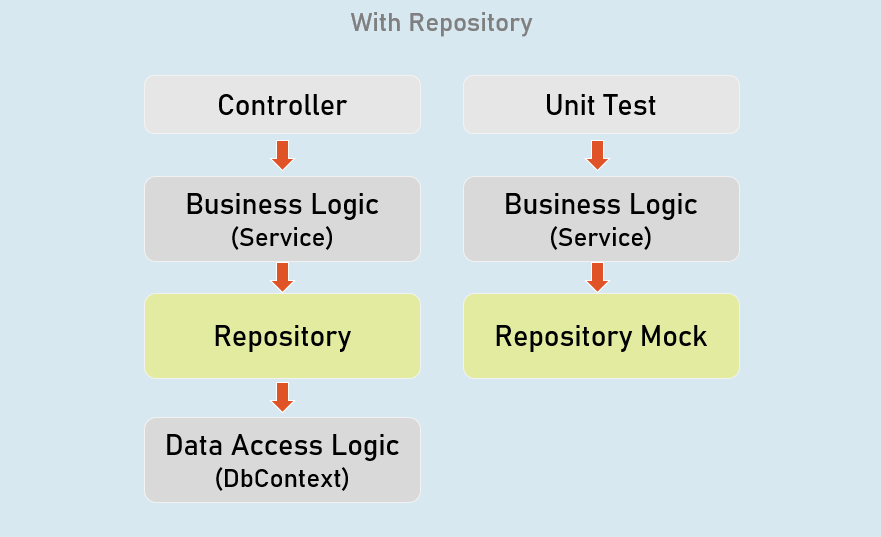
Repository (or Repository Pattern) is an abstraction between Data Access Layer (EF DbContext) and business logic layer (Service) of the application.
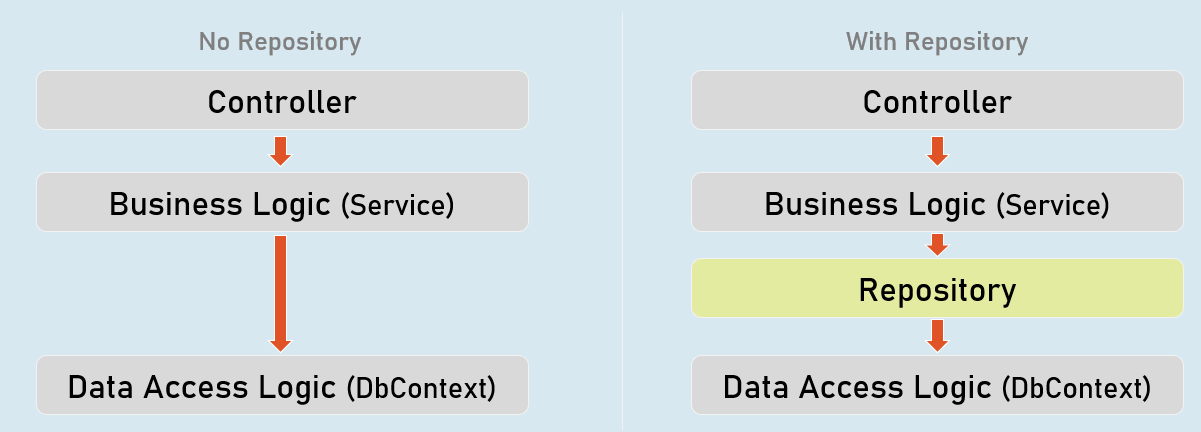
Unit Testing
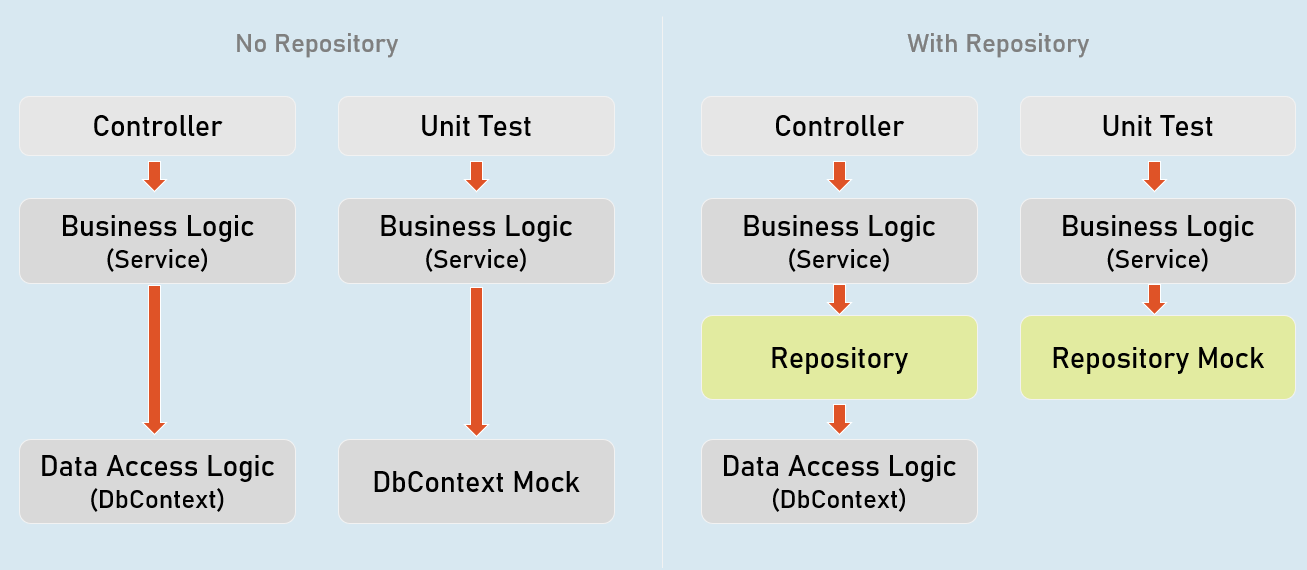
Benefits of Repository Pattern
Loosely-coupled business logic (service) & data access.
(You can independently develop them).Changing data store
(You can create alternative repository implementation for another data store, when needed).Unit Testing
(Mocking the repository is much easier (and preferred) than mocking DbContext).Mocking the Repository
Install-Package MoqMocking the Repository:
//mock the repository
Mock<IRepository> repositoryMock = new Mock<IRepository>();
//mock a method repository method
repositoryMock.Setup(temp => temp.MethodName(It.Any<ParameterType>()))
.Returns(return_value);
//create service instance with mocked repository
var service = newServiceClass(repositoryMock.Object);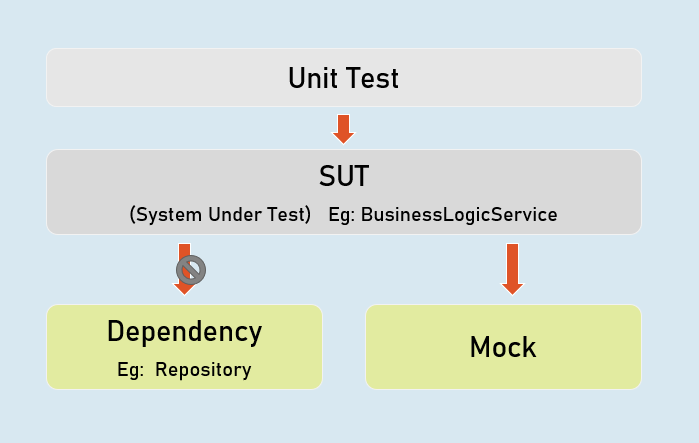
Mock
Used to mock the methods of IPersonsRepository.
IPersonsRepository
Represents the mocked object that was created by Mock
Unit Testing the Controller
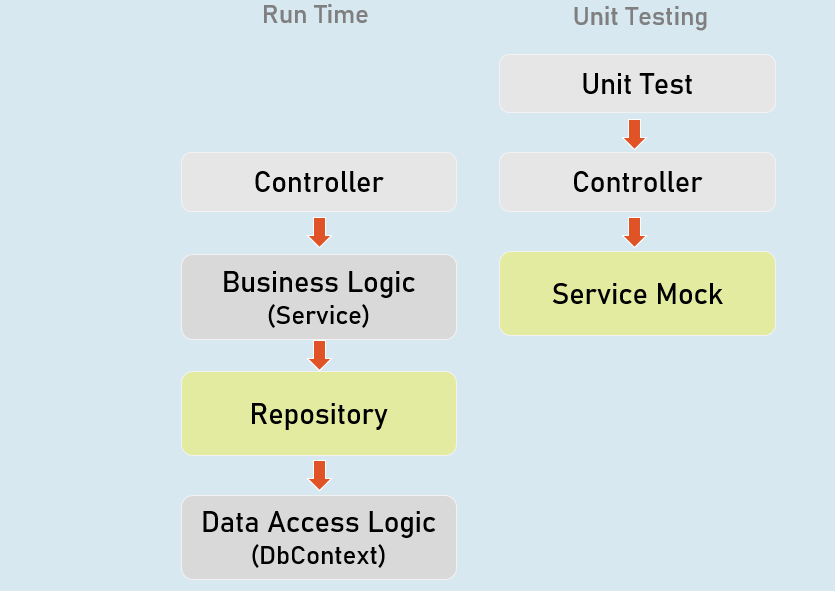
Unit Testing the Controller:
//ArrangeControllerName controller = new ControllerName();
//Act
IActionResult result = controller.ActionMethod();
//Assert
result.Should().BeAssignableTo<ActionResultType>(); //checking type of action result
result.ViewData.Model.Should().BeAssignableTo<ExpectedType>(); //checking type of model
result.ViewData.Model.Should().Be(expectedValue); //you can also use any other assertion
EFCore In-Memory Provider
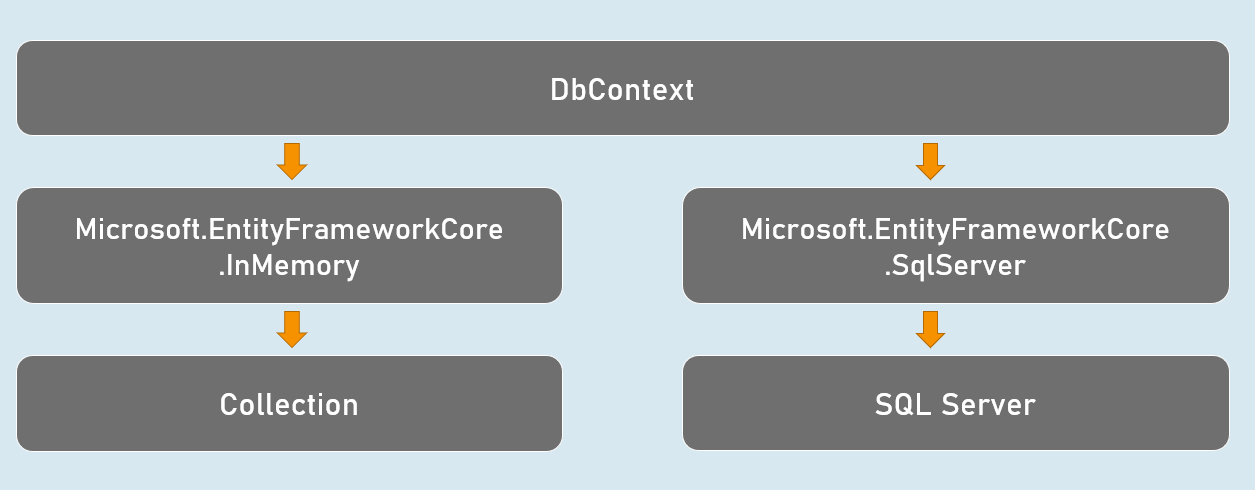
Install-Package Microsoft.EntityFrameworkCore.InMemoryUsing In-memory provider:
.Options;
var dbContextOptions =
new DbContextOptionsBuilder<DbContextClassName>()
.UseInMemoryDatabase("database_name");
var dbContext = newDbContextClassName(dbContextOptions);
Integration Test
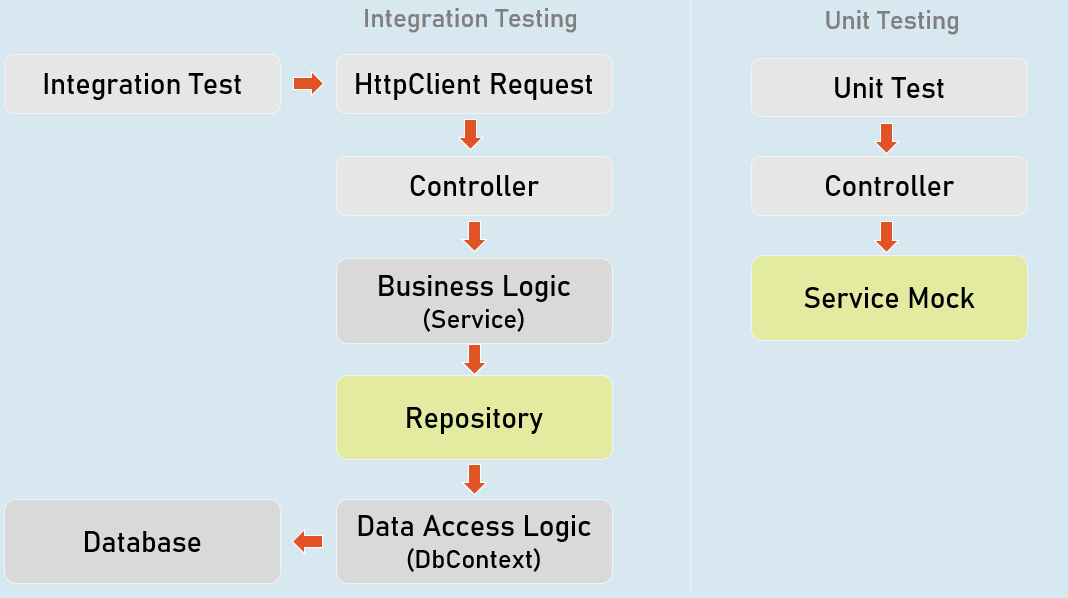
//Create factoryWebApplicationFactory factory = new WebApplicationFactory();
//Create client
HttpClient client = factory.CreateClient();
//Send request client
HttpResponseMessage response = await client.GetAsync("url");
//Assert
result.Should().BeSuccessful(); //Response status code should be 200 to 299